.jpg)
It is Thursday afternoon. A maintenance tech opens the warehouse, pulls a case of paper towels, five light bulbs, and two smoke detector batteries off the shelf. He has eight more properties to visit today. He'll fill out the sign-out sheet when he gets back.
He does not get back to it.
Nobody is being careless. Field operations just move fast, and the sign-out sheet was always an afterthought. The items are gone, the properties got what they needed, and somewhere between the warehouse door and the end of the day, the management company stopped recovering those costs.
We've talked to several operators losing more than $100,000 a year in costs they purchased, deployed, and never recovered. Not because their teams are careless. Because there is no easy system connecting what leaves the warehouse to what appears on an owner statement.
This is not a people problem. It is a tooling problem.
The Chain Nobody Connects
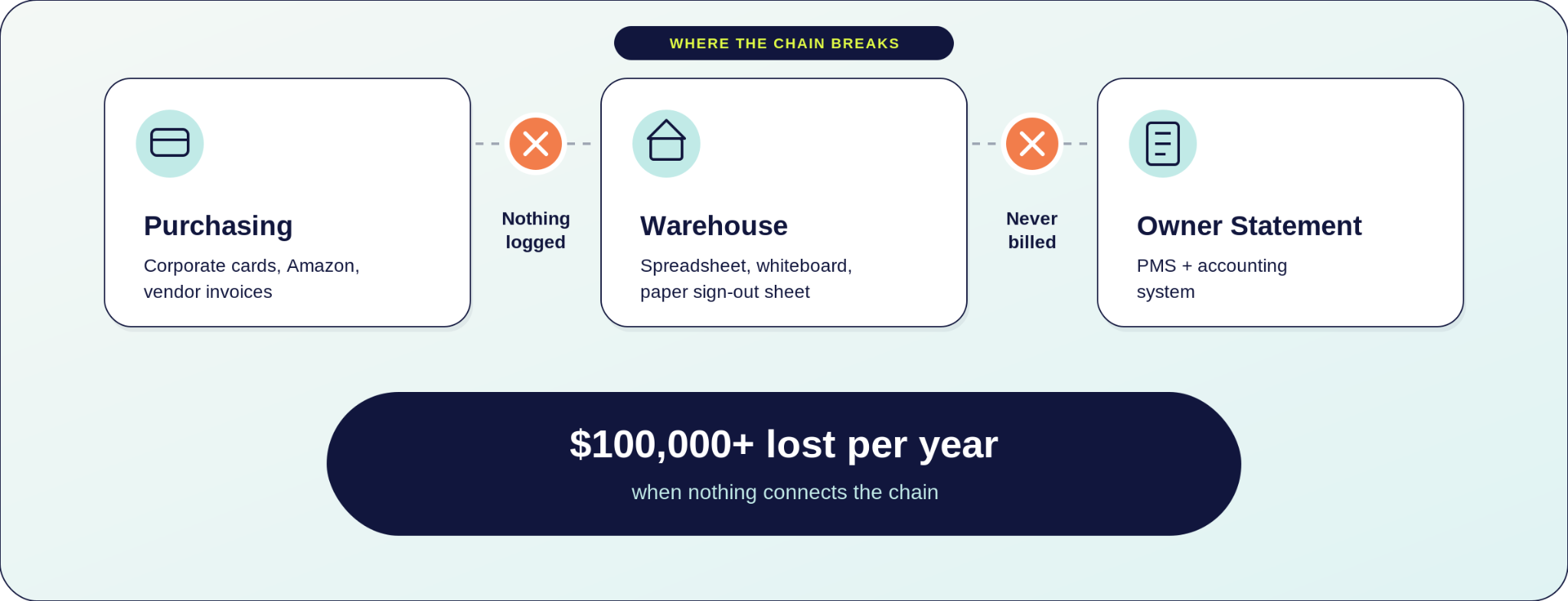
Every STR operator buys supplies on corporate cards, through Amazon orders, or on vendor invoices. Those items leave the warehouse and go to a property. And at the end of the month, those costs need to land on an owner statement in the PMS and in the accounting system where they belong.
Most operators have something for each part of that process. They buy supplies on corporate cards, through Amazon, or directly from vendors on invoice. They track what leaves the warehouse on a spreadsheet, a whiteboard, or a paper sign-out sheet. They have a PMS like Streamline, Guesty, Track, OwnerRez, Hostaway, Hospitable, Hostfully, or Feather. And at month-end, closing the books means jumping between their PMS, accounting system (QuickBooks Online, QuickBooks Desktop, Sage Intacct, NetSuite, or Xero), and whatever spreadsheets are holding everything together.
What they do not have is anything connecting those systems to each other.
The Amazon order that touched four properties. The bulk case of paper goods split across six units. The maintenance run where items were pulled from three shelf locations with nothing logged. At every handoff, a human has to manually bridge the gap. That human gets busy. Things fall through. Costs disappear.
When the portfolio is small, one organized ops person can sort of hold this together with a spreadsheet and a good memory. But as the portfolio grows, more properties means more inventory moving, more staff pulling from the warehouse, and more opportunities for costs to disappear without a trace. The leakage is happening whether you can see it or not. And every property you add makes it worse.
One operator told us they traced at least $100,000 in unbilled inventory back to a single property owner. That was not spread across the whole portfolio. It was one owner.
The problem is not the spreadsheet. It is not the sign-out sheet. It is that purchasing, deployment, and billing were never designed to talk to each other. That gap compounds every single month, and it compounds faster the bigger you get.
How Topkey Inventory Management Works
Topkey's inventory management was built for exactly this problem.It connects the purchasing, deployment, and billing workflows that STR operators are already running, and closes the gap that causes costs to disappear.
What Topkey replaces is the spreadsheet, the whiteboard, the paper sign-out sheet, and the manual month-end reconstruction. Tools like SOS Inventory, Box Hero, and Sortly track stock but cannot bill owners, push charges to a PMS, or connect to the purchasing workflows already in place. Topkey does all three.

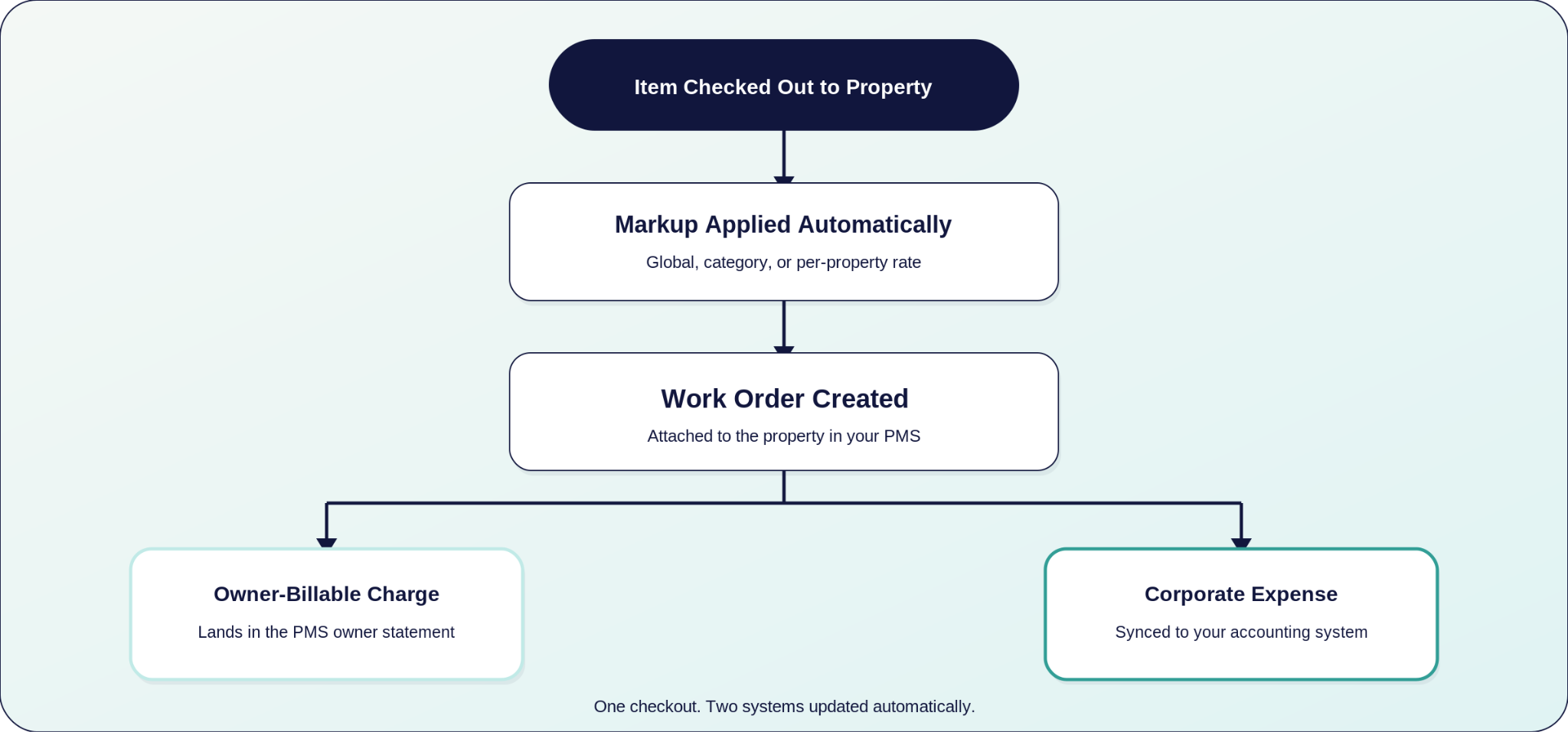
When a purchase flows in, stock updates. When items are checked out to a property, markup applies automatically, a work order is created, owner-billable charges push to the PMS, and corporate expenses sync to the accounting system. Nothing falls through because nothing is left to a manual handoff.
Step 1: Receiving Inventory
When a supply purchase comes in through corporate cards or a vendor invoice, staff categorizes the transaction as inventory. They link it to specific items in the catalog, record quantities received, and lock in the cost paid. Stock counts update immediately.
Pricing is anchored to what was actually paid, not a stale estimate from six months ago. When the cost of batteries or light bulbs goes up, the next receiving updates the number. Owner charges reflect what the company actually spent.
Topkey uses FIFO costing, meaning each unit draws from the oldest stock batch first. If supplies arrived in two separate shipments at different costs, a checkout that spans both batches blends the costs from each layer proportionally. Every owner charge reflects the actual historical cost of the specific units consumed, not a flat average.
For the ops manager, that means no more manually tracking which batch a unit came from, no more stale pricing on owner bills, and no uncomfortable conversation when an owner asks why they were charged $8 for something you bought at $5. The math is handled automatically, and every charge is fully auditable.
Step 2: Stock Management Across Every Location
Items are tracked per warehouse location. Main office, satellite storage, mobile tech van. Each location has its own count. Staff know exactly what is available and where before heading out to a property, which means no wasted trips, no showing up to a job without the right supplies, and no last-minute runs to the hardware store because nobody checked stock before leaving.
Low-stock alerts fire automatically when any item drops below its reorder point at any location. Account admins and managers are notified in-app and by email with a direct link to act. The alert fires per location, so a low count at the satellite warehouse does not get masked by full shelves at the main office. The ops manager finds out before the shortage becomes a problem, not after a cleaner calls to say there are no paper towels at the property.
As the portfolio grows, the difference between a smooth operation and one that is always scrambling comes down to whether procurement is proactive or reactive. With visibility across every location, the ops manager is making purchasing decisions based on real data instead of walking the warehouse and guessing.
Step 3: Checking Out to a Property
A staff member opens Topkey's inventory management, selects the property, and selects the items and quantities needed. Stock decrements immediately. The checkout is logged with the property, the staff member, the items, the quantities, and the cost. The record exists the moment the items leave the shelf, which means the ops manager always knows who took what, where it went, and what it cost without having to ask anyone.
No sign-out sheet, no reconstruction at month-end, and no asking the maintenance tech to remember what he took to which property three weeks ago.
For common jobs, reusable templates bundle item sets into a single checkout. A turnover kit, a cleaning kit, a linen set. Instead of selecting items one by one every time a property turns over, staff picks the template and every item in that kit is logged, costed, and tied to the property automatically. Templates can be built for any recurring job, so the ops manager sets them up once and the team executes consistently every time.
Step 4: Markup, Work Orders, and the PMS
Topkey applies the configured markup at checkout. Global markup, category-level markup, or a per-property override. The math is done before anyone opens their PMS, which means no manual markup calculations, no pricing errors, and no owner disputes over charges that were applied inconsistently.
The checkout creates a work order. The user attaches it to the property in the PMS and triggers the export. Owner-billable charges land in the PMS where the owner statement is produced. Corporate expenses sync to the accounting system. Topkey works with all of its existing PMS partners, so if the operator is already connected, inventory charges move through the same integration they use today.
Every item checked out is tied to a property and an owner. The ops manager is not chasing down what went where at month-end. The bookkeeper is not manually building owner charges from a sign-out sheet. The charges are already there, already correct, already in the PMS waiting to go on the statement.
Step 5: The Inventory Charges Report
At month-end, the bookkeeper opens the Inventory Charges Report, filters by date range, and exports to CSV. The full picture is right there. Properties, owners, items, charges. Everything that left the warehouse that month, accounted for.
This is what it looks like when the month closes itself. Clean data, ready to go, because every step was logged in real time as the work happened. The ops manager gets their time back. The bookkeeper stops spending hours chasing data that should have been automatic. And the owner gets a statement that reflects every dollar spent on their property, accurately, every single month.
Month-End Without the Reconstruction
It is the first of the month. The bookkeeper opens Topkey and runs the Inventory Charges Report for the prior month. Every item that left the warehouse is logged, every owner billed at the correct markup. Owner-billable charges are already sitting in the PMS ready for statement production. Corporate expenses have synced to the accounting system. The report gets exported to CSV and handed to accounting.
There is no reconstruction. There is no cross-referencing sign-out sheets with credit card statements with task notes from the field team. The chain closed automatically because every step was logged in the same system.
The maintenance tech who pulled paper towels, five light bulbs, and two smoke detector batteries on Thursday afternoon? That checkout is in the report. The property is named. The owner was billed. The cost was recovered.
The items that left the warehouse last month are not a mystery. They are a line item.
The leak that exists today does not stay the same size. Every property you add without a system makes it worse. The operators who were losing more than $50,000 a year solved it and you can too.
Schedule a demo to see Topkey inventory management in action. See it with your own items, your own warehouses, your own properties.
See the Topkey difference.