
Free 2026 Short-Term Rental 1099 Filing Kit
Download this ready-to-use 1099 filing kit created specifically for short-term rental property managers.
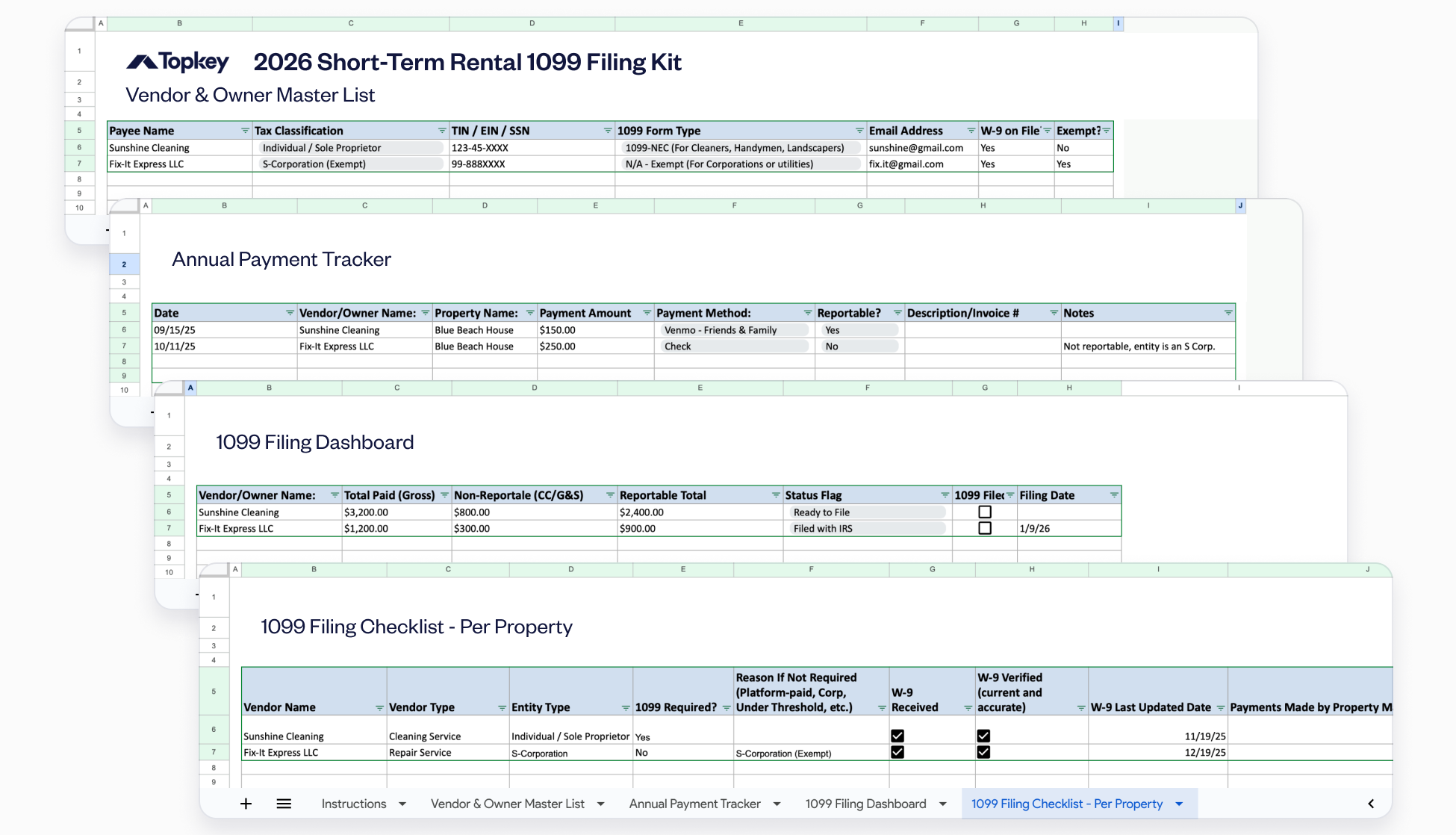
How to Use This STR 1099 Filing Kit
Filing 1099s correctly is essential for compliance — but short-term rental property managers face unique challenges with vendor classification, trust accounting, and multi-property operations.
This kit is built specifically for vacation rental and short-term rental managers to ensure accurate 1099 reporting. Use it to identify who needs a 1099, collect required information, and file on time to avoid penalties.
Overview: What This 1099 Filing Toolkit Does
This 1099 filing toolkit is built specifically for vacation rental and short-term rental property managers. It provides a complete workflow to identify vendors, collect W-9s, calculate reportable payments, and file 1099-NECs accurately and on time.
This system helps you:
- Maintain a centralized vendor database with all required tax information
- Track every payment throughout the year by property and payment method
- Calculate reportable amounts and identify filing requirements
- Avoid common STR-specific filing mistakes
- Meet IRS deadlines and stay compliant
To get started:
- Review your vendor list for the tax year
- Enter your transactions as they occur (or import historical data)
- Review the Filing Dashboard in early January
- File by January 31st to avoid penalties
What This Template Includes
Tab 1: Vendor & Owner Master List (Your Vendor Database)
Purpose: A centralized directory of all payees with their tax information and W-9 status.
What's included:
- Payee Name (legal name of individual or business)
- Tax Classification (dropdown: Individual/Sole Proprietor, LLC, S-Corporation, C-Corporation, Partnership, Attorney)
- TIN/EIN/SSN (tax identification number)
- 1099 Form Type (automatically determined based on tax classification)
- Email Address (for electronic delivery of forms)
- W-9 on File? (Yes/No checkbox)
- Exempt? (Yes/No - for corporations and other exempt entities)
How to use it:
- Add every vendor you pay before you make your first payment to them
- Request W-9 forms from all new vendors at onboarding
- Verify tax classification - this determines whether they're 1099-eligible or exempt
- Check the "W-9 on File" box only when you have a completed, signed W-9 stored
- Mark exempt entities (S-Corps, C-Corps, utilities) in the "Exempt?" column
Key information by vendor type:
- Cleaners, handymen, landscapers: Typically sole proprietors or single-member LLCs → require 1099-NEC
- Maintenance companies: Check tax classification → S-Corps and C-Corps are exempt
- Attorneys: Require 1099-NEC regardless of entity type (special IRS rule)
- Utilities & large corporations: Typically exempt from 1099 reporting
Common STR mistakes to avoid:
- Assuming all LLCs are exempt (only certain LLC types are exempt)
- Missing W-9s from irregular or small contractors
- Using owner information instead of vendor information
- Not updating vendor information when their business structure changes
Tab 2: Annual Payment Tracker (Transaction Log)
Purpose: Log every payment throughout the year to track what's reportable vs. non-reportable.
What's included:
- Date (when payment was made)
- Vendor/Owner Name (who you paid)
- Property Name (which STR property this expense relates to)
- Payment Amount (total paid)
- Payment Method (how you paid)
- Reportable? (automatically calculated based on payment method)
- Description/Invoice # (what the payment was for)
- Notes (special circumstances or clarifications)
How to use it:
- Download the template
- Log every payment to vendors as you make them throughout the year
- Select the correct payment method - this automatically determines reportability:
- Reportable methods: Check, ACH, Wire Transfer, Venmo (Friends & Family), Cash
- Non-reportable methods: Credit Card, PayPal (Goods & Services), Venmo (Goods & Services), Stripe
- Include all properties - if you manage multiple STRs, track payments across all of them
- Document payment purpose in the Description field for your records
STR-specific considerations:
- If you paid a cleaner from both your operating account and owner trust accounts, log all payments - they'll be combined in the dashboard
- For multi-property operations, aggregate all payments to the same vendor across properties
- If you use a PMS (property management system), export payment data and enter it into this tracker
- Track monthly to identify when you cross the $600 threshold with any vendor
Tab 3: 1099 Filing Dashboard (Summary & Action Items)
Purpose: A high-level view showing which vendors need 1099s filed and your filing status.
What's included:
- Vendor/Owner Name
- Total Paid (Gross) - sum of ALL payments to this vendor
- Non-Reportable (CC/G&S) - payments made via credit card or payment processor
- Reportable Total - only the payments that must be reported on 1099
- Status Flag - your assessment of what action is needed
- 1099 Filed? - checkbox to mark when form is submitted
- Filing Date - when you filed with the IRS
How to calculate and complete this dashboard:
- Total Paid (Gross): Sum all payments to each vendor from the Annual Payment Tracker (Tab 2)
- Non-Reportable (CC/G&S): Manually sum only credit card and payment processor transactions from the tracker
- Reportable Total: Manually calculate (Total Paid minus Non-Reportable)
- Status Flag: Manually enter the appropriate status by reviewing the vendor's information:
- Below Threshold - Reportable total is under $600 (no filing required)
- Exempt (Corporation) - Vendor is an S-Corp or C-Corp per Master List (no filing required)
- Action Required (Missing W-9) - Reportable total ≥ $600 but no W-9 on file per Master List
- Ready to File - Reportable total ≥ $600 and W-9 is on file (file this one!)
How to use it in January:
- Calculate totals for each vendor by reviewing the Annual Payment Tracker
- Determine the Status Flag by cross-referencing the Master List (W-9 status, entity type)
- Address all "Action Required" entries - request missing W-9s immediately
- File 1099s for all "Ready to File" vendors by January 31st
- Check the "1099 Filed?" box and enter the filing date when complete
Tab 4: Filing Checklist (Step-by-Step Actions)
Purpose: A detailed checklist to complete for each vendor who needs a 1099 filed. This ensures you don't skip any required steps.
What's included:
- Vendor Name (Sunshine Cleaning, Fix-It Express LLC)
- Vendor Type
- Entity Type
- 1099 Required? (Yes/No)
- Reason If Not Required (Platform-paid, Corp, Under Threshold, etc.)
- W-9 Received
- W-9 Verified (current and accurate)
- W-9 Last Updated Date
- Payments Made by Property Manager (1099-able)
- Payments Made by Platform (Excluded)
- Total Reportable Amount
- Payment Total Confirmed (matches records)
- Passed Through to Owner Statement? (Yes/No)
- 1099 Form Type (NEC/MISC)
- 1099 Filed with IRS
- Filing Date
- Vendor Copy Sent
- Vendor Copy Delivery Method (Mail/Email)
- Vendor Copy Sent Date
- Marked Complete in Dashboard
- Records Stored
- Storage Location
- 2026 Carry-Forward Notes
Why this tab matters: This checklist prevents costly mistakes like forgetting to send vendors their copies and creates a complete audit trail proving you met all IRS requirements. It ensures a consistent, step-by-step process across all vendors, especially helpful when multiple people are handling the filing.
Record Keeping & Ongoing Compliance
Proper documentation protects you in case of an audit and streamlines next year's filing.
What to keep:
- All W-9 forms (original signed copies)
- Copies of all filed 1099s
- Payment records and invoices
- Vendor contracts
- Correspondence about TIN verification
- This completed tracker and dashboard
How to organize:
- File documents by vendor name
- Store electronically with secure backups
- Retain for at least 4 years after filing
- Update vendor files when information changes
Set up for next year:
- Require W-9s from all new vendors before first payment
- Track payments monthly to identify $600 thresholds early
- Review vendor classification quarterly (business structure changes)
- Schedule 1099 prep for early January
- Update your Master List as vendors change
Summary & Recommended Workflow
This STR-specific 1099 system & checklist gives property managers:
- A clear database to manage vendor tax information
- Real-time tracking of reportable vs. non-reportable payments
- Automated calculations showing exactly who needs a 1099
- A clear action plan to file accurately and on time
How to use it effectively, throughout the year:
- Add new vendors to the Master List before first payment
- Request W-9 from every new vendor at onboarding
- Log payments in the Tracker as you make them
- Review the Dashboard quarterly to check who's approaching $600
In January:
- Start the 1099 process by January 5th
- Review the Filing Dashboard for all "Ready to File" vendors
- Chase down any missing W-9s immediately
- File all forms by January 31st to avoid penalties
- Check boxes to confirm filing and record dates
This system ensures compliance, avoids costly penalties, and protects your business as you scale.
Questions or Need Help?
If you need support or want help automating this process, email: info@topkey.io.