
Free Vacation Rental Owner Statement Template
Download this practical, customizable owner statement template for vacation rental managers.
Free Vacation Rental Owner Statement Template Download
NOTE: Topkey does not provide tax, legal, or accounting services. All information on this site is for educational purposes only.
How to Use This Owner Statement Template
Welcome! This template is designed to help vacation rental property managers generate clear, professional monthly owner statements.
To get started, fill out the form to download the template. Then, make a copy to make edits
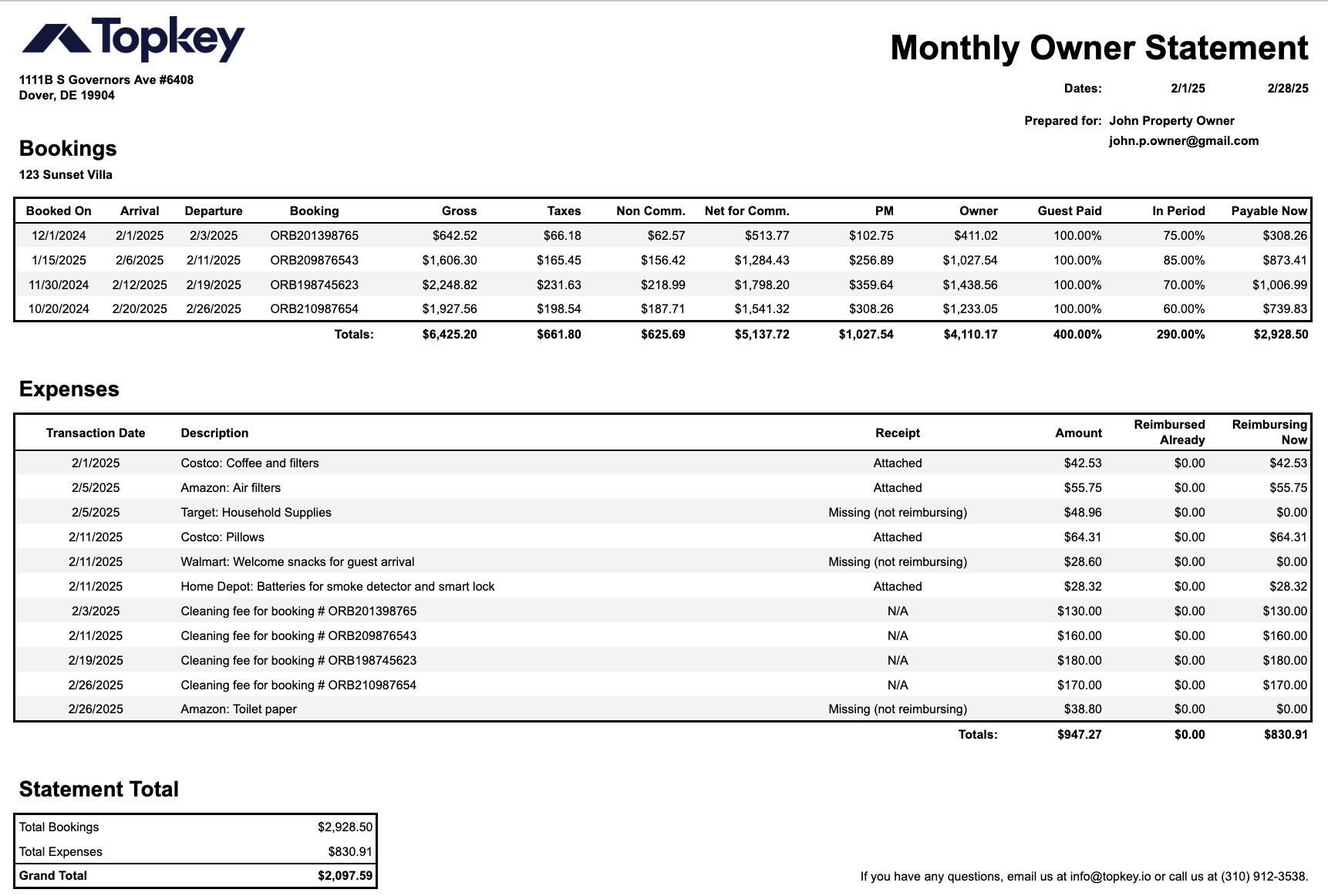
What This Owner Statement Template Includes (with Definitions)
Bookings - Summarizes all guest stays that fall within the selected statement period.
- Gross: Total paid by guest.
- Taxes & Non-Comm.: Deductions not subject to commission.
- Net for Comm. = Net amount for commissions.
- PM (Property Manager) Fee: Commission or deductions.
- Owner = Amount due to owner.
- In Period %: Portion of the booking that falls within the date range.
- Can Remit = Amount due to owner for this period.
Expenses - Lists reimbursable and non-reimbursable expenses paid by the manager.
- Date: The transaction date when the expense was incurred or posted.
- Description: Short description of the expense.
- Receipt: Reference to the status of the receipt.
- Amount: The full dollar amount paid by the property manager.
- Reimbursed Already: Amount that has already been reimbursed to the owner.
- Reimbursing Now: Amount eligible this period to be reimbursed to the owner based on receipt status and owner agreement.
Note: In this example owner statement template the property manager isn't reimbursing for expenses with missing receipts. This is commonly known as leakage. Learn more about how to avoid expense leakage here or get a demo to find out how Topkey helps you avoid leakage.
Statement Summary
- Totals Bookings: Total income eligible to remit.
- Totals Total Expenses: Total reimbursable expenses owed.
- Grand Total: what the manager will remit to the owner
Recommended Use:
- Make a copy of this spreadsheet to use.
- Create a new tab for each owner each month.
- Update booking rows using your reservation or PMS system.
- Record expenses from your card or accounting systems (or automate expense tracking with Topkey).
- Use formulas to ensure consistency and automate the math
- Add your company’s logo and contact info or branding before sending
Sending to Owners: We recommend exporting the filled statement as a PDF and emailing it along with any receipts or explanations.
Questions or Need Help?
If you need support or want help automating this process, email: info@topkey.io.